These are predefined attributes listed in the VHDL language reference manual.
An attribute in VHDL is a meta property that’s attached to a type or object. We can use them to get information about the item that goes beyond the value it carries. Some attributes are only for simulation, while others are also useful for avoiding hard-coded constants in synthesizable code.
Note: This list is still incomplete. I’m adding sections regularly and will remove this notice when finished.
Active
When applied to a signal s, the active attribute works like a function call, returning true if s is active during the current simulation cycle and false if not.
If s is a composite signal, the whole signal is considered active if one of the subelements are.
The term active means that a signal assignment, force, or release is scheduled for the current simulation cycle, even if it’s the same value as the signal already had.
    signal s : std_logic := '0';

begin

    process
    begin
        s <= '0';
        wait;
    end process;

    process
    begin
        report "Active: " & boolean'image(s'active);
        wait for 0 ns;
        report "Active: " & boolean'image(s'active);
        wait for 0 ns;
        report "Active: " & boolean'image(s'active);
        wait;
    end process;
# ** Note: Active: false
#    Time: 0 ns  Iteration: 0  Instance: /test_tb
# ** Note: Active: true
#    Time: 0 ns  Iteration: 1  Instance: /test_tb
# ** Note: Active: false
#    Time: 0 ns  Iteration: 2  Instance: /test_tb
Ascending
a‘ascending[(n)]
The ascending attributes can be applied to scalar types or objects of them, including subtypes and aliases. It returns a boolean value that will be true if p has ascending range or false if it’s descending.
When called on an array a, the optional n parameter specifies which index range to check. It defaults to 1 when omitted, which is the only legal value for one-dimensional arrays anyway. But for multi-dimensional arrays, an n > 1 will check the direction of a subdimension.
VHDL-2019 introduced p‘ascending, but earlier standards had t‘ascending. The rename came with an expanded prefix rule that explicitly allows objects and aliases, not just type names.
  signal s : std_logic_vector(7 downto 0);
  type t1 is array (0 to 9) of bit;
  type t2 is array (0 to 9, 7 downto 0) of bit;

begin

  process
  begin
    report "s'ascending: " & boolean'image(s'ascending);
    report "t1'ascending: " & boolean'image(t1'ascending);
    report "t2'ascending: " & boolean'image(t2'ascending);
    report "t2'ascending(1): " & boolean'image(t2'ascending(1));
    report "t2'ascending(2): " & boolean'image(t2'ascending(2));
    report "integer'ascending: " & boolean'image(integer'ascending);
    report "std_logic'ascending: " & boolean'image(std_logic'ascending);
    wait;
  end process;
The output (simplified) when ran in the Questa simulator:
# s'ascending: false
# t1'ascending: true
# t2'ascending: true
# t2'ascending(1): true
# t2'ascending(2): false
# integer'ascending: true
# std_logic'ascending: true
Base
t‘base
When applied to an object, type, or subtype p, the base attribute returns the underlying type from which it originates. If there are multiple layers of subtypes, you get the root type that’s not a subtype.
You cannot use this attribute standalone. It must appear in conjunction with a second attribute, for example, p‘base‘right.
Language revisions before VHDL-2019 only support calling ‘base on types and subtypes (t).
    subtype hex_type is integer range 0 to 15;
    subtype dec_type is hex_type range 0 to 9;
    signal p : dec_type;

begin

    process
    begin
        report "hex_type'base'right: " & integer'image(hex_type'base'right);
        report "dec_type'base'right: " & integer'image(dec_type'base'right);
        report "p'subtype'base'right: " & integer'image(p'subtype'base'right);
        -- (In VHDL-2019, you can do: p'base'right)
        wait;
    end process;
# ** Note: hex_type'base'right: 2147483647
#    Time: 0 ns  Iteration: 0  Instance: /test_tb
# ** Note: dec_type'base'right: 2147483647
#    Time: 0 ns  Iteration: 0  Instance: /test_tb
# ** Note: p'subtype'base'right: 2147483647
#    Time: 0 ns  Iteration: 0  Instance: /test_tb
Converse
VHDL-2019 adds mode views to interfaces and the converse attribute along with them. When called on a mode view m, converse returns a derived view with the modes from m transformed as follows:
| in | → | out |
| out | → | in |
| inout | → | inout |
| buffer | → | in |
| mode view (m) | → | m‘converse |
Consider this record and corresponding mode view:
type spi_if is record
  sclk : std_logic;
  mosi : std_logic;
  miso : std_logic;
end record;

view spi_master_if of spi_if is
  sclk : out;
  mosi : out;
  miso : in;
end view spi_master_if;
We could create an identical view with reversed data directions like this:
view spi_slave_if of spi_if is
  sclk : in;
  mosi : in;
  miso : out;
end view spi_slave_if;
Or we can achieve the same by using the converse attribute:
view spi_slave_if is spi_master_if'converse;
Delayed
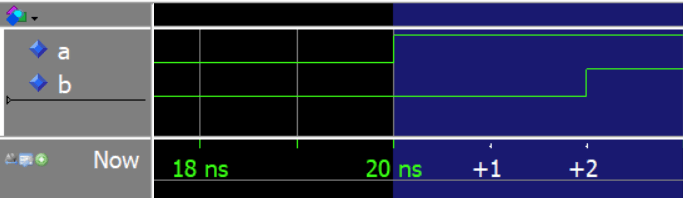
When applied to a signal s, the delayed attribute produces a signal that’s a copy of s, but with the transitions delayed by t time units. The derived signal will have a delay of one delta cycle if the optional t argument is omitted.
This example creates a signal b that’s delayed by one nanosecond from a.
  signal a : std_logic := '1';
  signal b : std_logic;

begin

  a <= not a after 5 ns;

  b <= a'delayed(1 ns);
The code above produces the following waveform in the VHDL simulator:

This example shows what happens if we don’t specify a time unit t.
  signal a : std_logic := '1';
  signal b : std_logic;

begin

  a <= not a after 5 ns;

  b <= a'delayed;
As we can see from the waveform below, signal b lags two delta cycles behind signal a. That’s because the derived signal is one delta cycle behind a, and when we copy it to b, it adds an additional delta delay.
Designated_subtype
When called on an access type or file type, object p, the designated_subtype attribute returns the subtype that the object references.
subtype byte_type is integer range 0 to 255;
type ptr is access byte_type;

-- This signal's type will be byte_type
signal sig : ptr'designated_subtype;
Driving
The driving attribute acts as a function returning a boolean value when applied to a signal s. You can only use this attribute from within a process or equivalent concurrent statement/subprogram. It will return true if the process is driving the signal and false otherwise.
If the s signal belongs to a port, it must have one of the following modes: inout, out, or buffer.
When used in a regular signal, the driving attribute always returns true. That’s because a process controlling a signal will always be driving it. However, that’s not always the case when it comes to guarded signals.
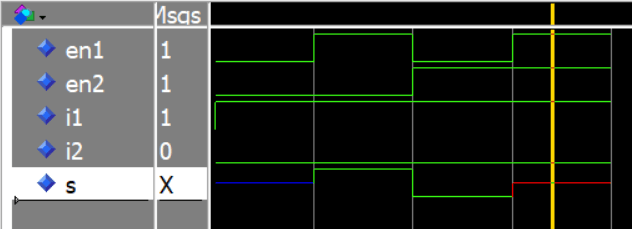
The demo below uses the driving attribute to print information about which process drives a value onto the common s signal bus.
Thanks to Bert Molenkamp for submitting this example to VHDLwhiz!
architecture sim of test_tb is

  signal i1, i2, en1, en2 : std_logic := '0';
  signal s : std_logic bus; -- Guarded signal

begin

  P1 : process(i1, en1)
  begin
    if en1 = '1' then s <= i1; else s <= null; end if;
    if s'driving then
      report "P1 is driving s <= " & std_logic'image(s'driving_value);
    else
      report "P1 is not driving s";
    end if;
  end process;

  P2 : process(i2, en2)
  begin
    if en2 = '1' then s <= i2; else s <= null; end if;
    if s'driving then
      report "P2 is driving s <= " & std_logic'image(s'driving_value);
    else
      report "P2 is not driving s";
    end if;
  end process;

  TEST_PROC : process
  begin

    i1 <= '1'; i2 <= '0';

    wait for 10 ns; en1 <= '1'; en2 <= '0';
    wait for 10 ns; en1 <= '0'; en2 <= '1';
    wait for 10 ns; en1 <= '1'; en2 <= '1';
    wait for 10 ns;

  end process;

end architecture;
The listing below shows the Questa simulator’s console printout after we simulate. The value of s'driving immediately reflects the latest signal assignment to s. We don’t have to wait until the next delta cycle for it to update after we assign s <= i1 or s <= null.
# ** Note: P2 is not driving s
#    Time: 0 ns  Iteration: 0  Instance: /test_tb
# ** Note: P1 is not driving s
#    Time: 0 ns  Iteration: 0  Instance: /test_tb
# ** Note: P1 is not driving s
#    Time: 0 ns  Iteration: 1  Instance: /test_tb
# ** Note: P1 is driving s <= '1'
#    Time: 10 ns  Iteration: 1  Instance: /test_tb
# ** Note: P1 is not driving s
#    Time: 20 ns  Iteration: 1  Instance: /test_tb
# ** Note: P2 is driving s <= '0'
#    Time: 20 ns  Iteration: 1  Instance: /test_tb
# ** Note: P1 is driving s <= '1'
#    Time: 30 ns  Iteration: 1  Instance: /test_tb
The waveform below shows the signals during simulation. As expected, s ends up in driver conflict when we enable both driving processes with conflicting values.
Driving_value
When applied to a signal, s, the driving_value attribute works like a function call, returning the value that the enclosing process is driving onto the signal.
You can only use this attribute within a process or subprogram.
Calling driving_value on a signal that the process isn’t driving produces a runtime error. You can use the driving attribute to check if a process currently drives a signal.
architecture sim of test_tb is

  signal s : std_logic;

begin

  PROC_A : process
  begin
    s <= '1';
    wait for 0 ns;
    report "PROC_A drives " & std_logic'image(s'driving_value) &
    ", but s is " & std_logic'image(s);
    wait;
  end process;

  PROC_B : process
  begin
    s <= '0';
    wait for 0 ns;
    report "PROC_B drives " & std_logic'image(s'driving_value) &
      ", but s is " & std_logic'image(s);
    wait;
  end process;

end architecture;
As we can see from the output below, the driving value may differ from the actual value of a resolved or guarded signal.
# ** Note: PROC_B drives '0', but s is 'X'
#    Time: 0 ns  Iteration: 1  Instance: /test_tb
# ** Note: PROC_A drives '1', but s is 'X'
#    Time: 0 ns  Iteration: 1  Instance: /test_tb
Element
The element attribute can only be applied to an array type or a signal or variable of an array type. When applied to such an object, a, it returns the subtype of the array elements.
Thus, you can use 'element to declare new objects, as shown in the example below.
-- The std_logic_vector type is an array of std_logic
signal vec : std_logic_vector(3 downto 0) := "0101";

-- sig1 becomes a std_logic type signal
signal sig1 : vec'element;

type arr_type is array (natural range <>) of integer;

-- sig2 becomes an integer type signal
signal sig2 : arr_type'element;
Event
When applied to a signal s, the event attribute works like a function call, returning true if an event occurred on s during the current simulation cycle and false if not.
The term event in the context of VHDL simply means that a signal changes value. A signal assignment only causes an event if the value changes. Assigning the same value again won’t cause an event.
architecture sim of events_tb is

  signal sig1, sig2, sig3 : std_logic := '0';

begin

  sig1 <= '1' after 10 ns;
  sig2 <= sig1;
  sig3 <= sig2;

  process(sig1, sig2, sig3)
  begin

    if sig1'event then
      report "sig1 changed";
    end if;

    if sig2'event then
      report "sig2 changed";
    end if;

    if sig3'event then
      report "sig3 changed";
    end if;

  end process;

end architecture;
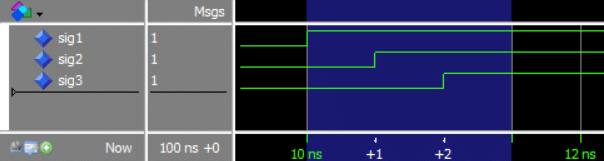
The example code above has three signals that all change at 10 ns simulation time but in different delta cycles due to the cascading concurrent assignments. The process is sensitive to changes on either signal, and we’re using 'event to determine which signal changed and print a message to the simulator’s transcript window.
As we can see from the printout below, the process prints a message every time a signal changes. All at 10 ns, but the iteration numbers are incrementing for each signal.
# ** Note: sig1 changed
#    Time: 10 ns  Iteration: 0  Instance: /events_tb
# ** Note: sig2 changed
#    Time: 10 ns  Iteration: 1  Instance: /events_tb
# ** Note: sig3 changed
#    Time: 10 ns  Iteration: 2  Instance: /events_tb
We can also observe this visually by expanding delta cycles at the 10 ns mark in the Questa simulator’s waveform viewer:
High
This attribute works like a function returning the upper bound (highest index) of the object (a) it’s attached to. It may be used on any object whose range is constrained.
If the object is a multi-dimensional array, you can specify the dimension to check using the optional n parameter. It defaults to n = 1, which is also the only option for one-dimensional vectors.
  subtype int_t is integer range 0 to 15;
  subtype real_t is real range 1.0 to 3.14;

  signal slv_dt : std_logic_vector(7 downto 0);
  signal slv_to : std_logic_vector(0 to 7);

  type arr_2d_t is array (3 downto 0, 7 downto 0) of std_logic;
  signal arr_2d : arr_2d_t;

begin


  process
  begin
    report LF &

      -- Unconstrained integer
      "integer'high: " & integer'image(integer'high) & LF &

      "int_t'high: " & integer'image(int_t'high) & LF &
      "real_t'high: " & real'image(real_t'high) & LF &

      "slv_dt'high: " & integer'image(slv_dt'high) & LF &
      "slv_to'high: " & integer'image(slv_to'high) & LF &

      "arr_2d(1)'high: " & integer'image(arr_2d'high(1)) & LF &
      "arr_2d(2)'high: " & integer'image(arr_2d'high(2));

    wait;
  end process;
The output shows that the high attribute returns the index with the highest value regardless of ascending/descending range direction:
# integer'high: 2147483647
# int_t'high: 15
# real_t'high: 3.140000e+00
# slv_dt'high: 7
# slv_to'high: 7
# arr_2d(1)'high: 3
# arr_2d(2)'high: 7
Image
t‘image(o)
This attribute acts as a function that converts an object’s value to a string representation.
Apply the attribute to a type or subtype (t) and pass a constant, signal, or variable name (o) as a single argument. The attribute will then return a string with the object’s value(s).
In older VHDL revisions, the image attribute only worked on scalar and enumerated types, but in VHDL-2019, it will also work on composite types like records and arrays.
Furthermore, VHDL-2019 introduces a shorthand notation that enables you to call the attribute directly on the object instead of referencing the object’s type. o‘image is shorthand for: o‘subtype‘image(o).
  signal my_boolean : boolean := true;
  signal my_integer : integer := 88;
  signal my_real : real := 3.14;
  signal my_bit : bit := '0';
  signal my_std_logic : std_logic := '1';
  signal my_slv : std_logic_vector(7 downto 0) := "10101100";
  signal my_unsigned : unsigned(7 downto 0) := "00000001";
  signal my_signed : signed(7 downto 0) := "10000000";

  type my_record_t is record
    a : integer;
    b : std_logic;
    c : std_logic_vector(7 downto 0);
  end record;

  signal my_record : my_record_t := (99, '1', "11001010");

begin

  process
  begin

    report "my_boolean: " & boolean'image(my_boolean);
    report "my_integer: " & integer'image(my_integer);
    report "my_real: " & real'image(my_real);
    report "my_bit: " & bit'image(my_bit);
    report "my_std_logic: " & std_logic'image(my_std_logic);

    -- Composite types (VHDL-2019 only):
    report "my_slv: " & std_logic_vector'image(my_slv);
    report "my_unsigned: " & unsigned'image(my_unsigned);
    report "my_signed: " & signed'image(my_signed);
    report "my_record: " & my_record_t'image(my_record);

    -- Shorthand notation (VHDL-2019 only):
    report "my_boolean: " & my_boolean'image;
    report "my_integer: " & my_integer'image;
    report "my_real: " & my_real'image;
    report "my_bit: " & my_bit'image;
    report "my_std_logic: " & my_std_logic'image;

    wait;
  end process;
As of April 2026, the Questa simulator supports the image attribute for composite types (with the vsim -2019 flag), but it doesn’t support the shorthand notation.
Here’s the output (simplified) of the example ran in Aldec Riviera Pro:
# my_boolean: true
# my_integer: 88
# my_real: 3.140000e+000
# my_bit: '0'
# my_std_logic: '1'
# my_slv: "10101100"
# my_unsigned: "00000001"
# my_signed: "10000000"
# my_record: (99,'1',"11001010")
# my_boolean: true
# my_integer: 88
# my_real: 3.140000e+000
# my_bit: '0'
# my_std_logic: '1'
Index
The index attribute returns the subtype of the index range for an array type’s given dimension. It can be used on an object, a, that’s either an array type/subtype or an object of array type.
The optional n parameter selects one dimension from the array, starting at 1. If no value is given, n defaults to 1. Higher values are only useful for multi-dimensional arrays.
Unlike the element attribute, which returns the element subtype, ‘index returns the index subtype.
type mat_t is array (0 to 3, 7 to 9) of bit;

signal s0 : mat_t'index;  -- Same as 'index(1)
signal s1 : mat_t'index(1);  -- s1's type is integer range 0 to 3
signal s2 : mat_t'index(2);  -- s2's type is integer range 7 to 9

signal vec : std_logic_vector(7 downto 0);
signal s4 : vec'index; -- s4's type is integer range 7 downto 0
Instance_name
When applied to a named entity e, the instance_name attribute returns a lowercase string describing the full hierarchical path from the root module to e. A package-based path is produced instead if e is within a package
Note that the term named entity is not limited to modules defined using the VHDL entity keyword. It also includes other objects or constructs that can be referenced by name. Thus, instance_name can also be used on signals, variables, constants, and other labeled constructs such as loops or subprograms.
The prefix can be any named entity except the local ports and generics of a component declaration.
VHDL-2019 clarifies that the path must identify the specific protected type object, so different variables of the same type get distinct instance names. It also adds support for sequential block statements in the path.
entity my_dut is
  port (clk : in bit);
end entity;

architecture rtl of my_dut is

  procedure my_proc(param1 : integer) is
  begin
  end procedure;

begin
  process
  begin

    MY_LOOP : for i in 0 to 0 loop
      report "From loop: " & i'instance_name;
    end loop;

    report "From DUT: " & my_proc'instance_name;
    report "From DUT: " & my_dut'instance_name;
    report "From DUT: " & clk'instance_name;
    report "From DUT: " & MY_LOOP'instance_name;
    wait;
  end process;
end architecture;

entity my_testbench is
end entity;

architecture sim of my_testbench is
  signal clk : bit := '0';
begin

  DUT : entity work.my_dut(rtl)
    port map (clk => clk);

  process
  begin
    report "In a package: " & bit'instance_name;

    report "From TB: " & my_testbench'instance_name;
    report "From TB: " & DUT'instance_name;
    wait;
  end process;

end architecture;
The output when ran in the Questa simulator (simplified):
# In a package: :std:standard:bit:
# From TB: :my_testbench(sim):
# From TB: :my_testbench(sim):dut:
# From loop: :my_testbench(sim):dut@my_dut(rtl)::i
# From DUT: :my_testbench(sim):dut@my_dut(rtl):my_proc[integer]:
# From DUT: :my_testbench(sim):dut@my_dut(rtl):
# From DUT: :my_testbench(sim):dut@my_dut(rtl):clk
# From DUT: :my_testbench(sim):dut@my_dut(rtl):my_loop:
Left
This attribute works like a function returning the left bound (leftmost index) of the object it’s attached to. It may be used on any object whose range is constrained.
If the object is a multi-dimensional array, you can specify the dimension to check using the optional n parameter. It defaults to n = 1, which is also the only option for one-dimensional vectors.
  subtype int_t is integer range 0 to 15;
  subtype real_t is real range 1.0 to 3.14;

  signal slv_dt : std_logic_vector(7 downto 0);
  signal slv_to : std_logic_vector(0 to 7);

  type arr_2d_t is array (3 downto 0, 7 downto 0) of std_logic;
  signal arr_2d : arr_2d_t;

begin


  process
  begin
    report LF &

      -- Unconstrained integer
      "integer'left: " & integer'image(integer'left) & LF &

      "int_t'left: " & integer'image(int_t'left) & LF &
      "real_t'left: " & real'image(real_t'left) & LF &

      "slv_dt'left: " & integer'image(slv_dt'left) & LF &
      "slv_to'left: " & integer'image(slv_to'left) & LF &

      "arr_2d(1)'left: " & integer'image(arr_2d'left(1)) & LF &
      "arr_2d(2)'left: " & integer'image(arr_2d'left(2));

    wait;
  end process;
The output shows that the left attribute returns the leftmost value from the type/object’s definition regardless of ascending/descending range direction:
# integer'left: -2147483648
# int_t'left: 0
# real_t'left: 1.000000e+00
# slv_dt'left: 7
# slv_to'left: 0
# arr_2d(1)'left: 3
# arr_2d(2)'left: 7
Leftof
t‘leftof(x)
The leftof attribute works like a function attached to an object of discrete scalar type, t. It has a mandatory parameter, x, which must be among the enumeration values or in the range. When called, it returns the value that’s defined directly to the left of x.
VHDL-2019 introduced o‘leftof, which is a shorthand notation for o‘subtype‘leftof(o).
  type state_t is (IDLE, SENDING, RECEIVING);
  signal state : state_t;

begin

  process
  begin

  	state <= RECEIVING;
    wait for 10 ns; report "state is: " & to_string(state);

    state <= state'leftof(state);
    wait for 10 ns; report "state is: " & to_string(state);

    state <= state'leftof; -- Same as state'leftof(state);
    wait for 10 ns; report "state is: " & to_string(state);

    report to_string(positive'leftof(10)); -- 9
    report to_string(character'leftof('B')); -- A
    report to_string(boolean'leftof(true)); -- false

    finish;
  end process;
The transcript from the demo simulation in Aldec Riviera Pro:
# NOTE   : state is: receiving
# Time: 10 ns,  Iteration: 0
# NOTE   : state is: sending
# Time: 20 ns,  Iteration: 0
# NOTE   : state is: idle
# Time: 30 ns,  Iteration: 0
# NOTE   : 9
# Time: 30 ns,  Iteration: 0
# NOTE   : A
# Time: 30 ns,  Iteration: 0
# NOTE   : false
# Time: 30 ns,  Iteration: 0
Length
p‘length≥ VHDL-2019
When applied to an array object or a constrained array subtype a, the length attribute behaves like a function that returns the number of elements in the nth index range as an integer.
The optional n parameter selects the dimension in multi-dimensional arrays. It defaults to 1 because for a one-dimensional vector, n can only be 1. It returns 0 if a null range is selected.
VHDL-2019 added p‘length, which returns the number of values in a discrete or physical scalar subtype’s range. For example, it can be used to find the number of elements in an enumerated type.
  signal slv : std_logic_vector(7 downto 0);
  type arr_1d_t is array (0 to 9) of bit;
  type arr_2d_t is array (0 to 9, 7 downto 0) of bit;
  type state_t is (IDLE, READ, WRITE, DONE);
  subtype addr_range is integer range 768 to 1023;
  signal sl : std_logic;

begin

  process
  begin
    -- Array form, works in all VHDL revisions
    report "slv'length: " & to_string(slv'length);
    report "arr_1d_t'length: " & to_string(arr_1d_t'length);
    report "arr_2d_t'length: " & to_string(arr_2d_t'length);
    report "arr_2d_t'length(1): " & to_string(arr_2d_t'length(1));
    report "arr_2d_t'length(2): " & to_string(arr_2d_t'length(2));

    -- Scalar form, VHDL-2019 only
    report "state_t'length: " & to_string(state_t'length);
    report "addr_range'length: " & to_string(addr_range'length);
    report "std_logic'length: " & to_string(std_logic'length);
    report "sl'length: " & to_string(sl'length);
    wait;
  end process;
Below is the (simplified) output from simulating the code in Aldec Riviera Pro.
Note that std_logic'length and sl'length both return 9. That’s because std_logic is an enumerated type with 9 possible values, and applying the length attribute to the signal sl returns the length of its underlying type.
# slv'length: 8
# arr_1d_t'length: 10
# arr_2d_t'length: 10
# arr_2d_t'length(1): 10
# arr_2d_t'length(2): 8
# state_t'length: 4
# addr_range'length: 1024
# std_logic'length: 9
# sl'length: 9
Low
This attribute works like a function returning the lower bound (lowest index) of the object (a) it’s attached to. It may be used on any object whose range is constrained.
If the object is a multi-dimensional array, you can specify the dimension to check using the optional n parameter. It defaults to n = 1, which is also the only option for one-dimensional vectors.
  subtype int_t is integer range 0 to 15;
  subtype real_t is real range 1.0 to 3.14;

  signal slv_dt : std_logic_vector(7 downto 0);
  signal slv_to : std_logic_vector(0 to 7);

  type arr_2d_t is array (3 downto 0, 7 downto 0) of std_logic;
  signal arr_2d : arr_2d_t;

begin


  process
  begin
    report LF &

      -- Unconstrained integer
      "integer'low: " & integer'image(integer'low) & LF &

      "int_t'low: " & integer'image(int_t'low) & LF &
      "real_t'low: " & real'image(real_t'low) & LF &

      "slv_dt'low: " & integer'image(slv_dt'low) & LF &
      "slv_to'low: " & integer'image(slv_to'low) & LF &

      "arr_2d(1)'low: " & integer'image(arr_2d'low(1)) & LF &
      "arr_2d(2)'low: " & integer'image(arr_2d'low(2));

    wait;
  end process;
The output shows that the low attribute returns the index with the lowest value regardless of ascending/descending range direction:
# integer'low: -2147483648
# int_t'low: 0
# real_t'low: 1.000000e+00
# slv_dt'low: 0
# slv_to'low: 0
# arr_2d(1)'low: 0
# arr_2d(2)'low: 0
Path_name
The path_name attribute works similarly to instance_name, producing a string describing the full hierarchical path from the root of the design hierarchy to e. See the instance_name attribute specification for all details that also apply to path_name.
The paths will be identical to instance_name except that architecture names are omitted and component instantiations show only the label.
For example, dut@my_dut(rtl) becomes simply dut. The example below is identical to the instance_name example, but using path_name instead.
entity my_dut is
  port (clk : in bit);
end entity;

architecture rtl of my_dut is

  procedure my_proc(param1 : integer) is
  begin
  end procedure;

begin
  process
  begin

    MY_LOOP : for i in 0 to 0 loop
      report "From loop: " & i'path_name;
    end loop;

    report "From DUT: " & my_proc'path_name;
    report "From DUT: " & my_dut'path_name;
    report "From DUT: " & clk'path_name;
    report "From DUT: " & MY_LOOP'path_name;
    wait;
  end process;
end architecture;

entity my_testbench is
end entity;

architecture sim of my_testbench is
  signal clk : bit := '0';
begin

  DUT : entity work.my_dut(rtl)
    port map (clk => clk);

  process
  begin
    report "In a package: " & bit'path_name;

    report "From TB: " & my_testbench'path_name;
    report "From TB: " & DUT'path_name;
    wait;
  end process;

end architecture;
The output when ran in the Questa simulator (simplified):
# In a package: :std:standard:bit:
# From TB: :my_testbench:
# From TB: :my_testbench:dut:
# From loop: :my_testbench:dut::i
# From DUT: :my_testbench:dut:my_proc[integer]:
# From DUT: :my_testbench:dut:
# From DUT: :my_testbench:dut:clk
# From DUT: :my_testbench:dut:my_loop:
Pos
t‘pos(x)
The pos attribute is a function that returns the position of the value x within the ordered set of values of the (sub)type as an integer.
You can apply ‘pos to a discrete or physical type or subtype t, with an x parameter that must be a value that the (sub)type can represent. VHDL-2019 adds a shorthand notation that lets you call the attribute directly on an object: o‘pos is shorthand for o‘subtype‘pos(o)
‘pos is the inverse of ‘val, and therefore t‘pos(t‘val(x)) returns x.
A common usage of ‘pos is to convert a character literal to its character code (see example below). That’s because VHDL’s character type is deliberately laid out to match the Latin‑1 character set, which is also backward compatible with ASCII.
  type state_t is (IDLE, RUNNING, STOPPED);
  signal state : state_t := STOPPED;

begin

  process
  begin

      -- The integer value returned by character'pos matches the
    -- ASCII code because its enumeration literals have that ordering
    report "character'pos('A): " & to_string(character'pos('A'));

    -- bit'pos is actually a good way to convert a bit to an integer.
    -- But it doesn't work for std_logic because of its meta values.
    report "bit'pos('0'): " & to_string(bit'pos('0'));
    report "bit'pos('1'): " & to_string(bit'pos('1'));

    report "integer'pos(42): " & to_string(integer'pos(42));

    report "state_t'pos(IDLE): " & to_string(state_t'pos(IDLE));
    report "state_t'pos(RUNNING): " & to_string(state_t'pos(RUNNING));
    report "state_t'pos(STOPPED): " & to_string(state_t'pos(STOPPED));

    -- VHDL-2019 shorthand. Doesn't work in Questa as of April 2026
    report "state'pos: " & to_string(state'pos);

    wait;
  end process;
Here’s the output (simplified) when simulated in Aldec Riviera Pro:
# character'pos('A): 65
# bit'pos('0'): 0
# bit'pos('1'): 1
# integer'pos(42): 42
# state_t'pos(IDLE): 0
# state_t'pos(RUNNING): 1
# state_t'pos(STOPPED): 2
# state'pos: 2
Quiet
When applied to a signal s, the quiet attribute produces a derived signal of boolean type. The resulting signal’s value is true if s was quiet for t time before the current simulation time. Otherwise, it has the value false.
The time value defaults to 0 ns if you omit the optional t parameter.
A signal is quiet if no assignments happen within the given period. When a value is scheduled or forced onto the signal, it is no longer quiet, even if it’s the same value as the signal already had.
  signal quiet_50_ns : boolean;

begin

  quiet_50_ns <= sig'quiet(50 ns);
Range
a‘range[(n)]
The range attribute can be applied to a constrained array subtype a, scalar type or subtype p, or an object from these. For an array prefix, it returns the array’s index range. For a scalar prefix, it returns the range of the (sub)type itself.
VHDL-2019 added support for also using the range attribute on scalar types. This means 'range can now be used to iterate over enumerated types (see example below).
A range in VHDL is a pair of bounds with a direction, like 0 to 7 or 7 downto 0. Integer and enumeration ranges are discrete and can be used to drive For loops or index arrays. Ranges such as 0.0 to 5.0 and physical ranges such as 0 ns to 100 ns are also valid, but they cannot be iterated over in a For loop since they are not discrete ranges.
For an array prefix a, the optional parameter n selects the dimension. It defaults to 1. For a multi‑dimensional array, n can be any value from 1 up to the array’s dimensionality.
  -- Define a descending discrete integer range
  subtype byte_r is integer range 7 downto 0;

  -- Use that subtype to constrain a bit_vector
  subtype byte_t is bit_vector(byte_r);
  signal byte : byte_t;

  -- A 2D array
  type arr_2d_t is array (0 to 3, 7 downto 0) of bit;

  -- An enumerated type ('range is only supported in VHDL-2019)
  type state_t is (S0, S1, S2);

  -- You can't loop over a non-discrete ranges like these
  subtype voltage_t is real range 0.0 to 5.0;
  subtype setup_time_t is time range 0 ns to 100 ns;

begin

  process
  begin

    -- You can apply the 'range attribute to a signal
    for i in byte'range loop
      report "byte(" & to_string(i) & "): " & to_string(byte(i));
    end loop;

    -- Or you can apply 'range to a type
    for i in arr_2d_t'range loop
      report "arr_2d_t'range:" & to_string(i);
    end loop;

    -- Select the second dimension explicitly
    for i in arr_2d_t'range(2) loop
      report "arr_2d_t'range(2):" & to_string(i);
    end loop;

    -- This only works in VHDL-2019
    for v in state_t'range loop
      report "state_t'range: " & state_t'image(v);
    end loop;

    wait;
  end process;
The output (simplified) when simulated in Aldec Riviera Pro:
# byte(7): 0
# byte(6): 0
# byte(5): 0
# byte(4): 0
# byte(3): 0
# byte(2): 0
# byte(1): 0
# byte(0): 0
# arr_2d_t'range:0
# arr_2d_t'range:1
# arr_2d_t'range:2
# arr_2d_t'range:3
# arr_2d_t'range(2):7
# arr_2d_t'range(2):6
# arr_2d_t'range(2):5
# arr_2d_t'range(2):4
# arr_2d_t'range(2):3
# arr_2d_t'range(2):2
# arr_2d_t'range(2):1
# arr_2d_t'range(2):0
# state_t'range: s0
# state_t'range: s1
# state_t'range: s2
Record
The record attribute returns the record type that VHDL implicitly defines for every scalar type’s range, shown below. Its prefix r is not a type or an object but another attribute that produces a range, typically ‘range or ‘reverse_range.
type <unnamed_range_record> is record
  Left : <scalar_type>;
  Right : <scalar_type>;
  Direction : RANGE_DIRECTION;
end record;
The companion r‘value attribute returns an instance of the record (see example below).
    variable r : byte'range'record;

  begin

    r := byte'range'value;

    report "Left: " & to_string(r.Left);
    report "Right: " & to_string(r.Right);
    report "Direction: " & to_string(r.Direction);

    wait;
  end process;
Here’s the output (simplified) when simulated in Aldec Riviera Pro:
# Left: 7
# Right: 0
# Direction: descending
Reverse_range
a‘reverse_range[(n)]
The reverse_range attribute can be applied to a constrained array subtype a, scalar type or subtype p, or an object from these. It behaves exactly like the range attribute, but with the direction flipped. For example, bit_vector(7 downto 0)'reverse_range yields the range 0 to 7.
As with 'range, the scalar form was added in VHDL‑2019. Before that, reverse_range was an array‑only attribute.
For an array prefix a, the optional parameter n selects the dimension. It defaults to 1.
It’s useful for flipping bit order or iterating in reverse in For loops.
  signal byte_be : bit_vector(7 downto 0);
  signal byte_le : bit_vector(byte_be'reverse_range);

begin

  process
  begin

    for i in byte_be'reverse_range loop
      report "i: " & to_string(i);
    end loop;

    wait;
  end process;
The output (simplified) when simulated in Questa:
# i: 0
# i: 1
# i: 2
# i: 3
# i: 4
# i: 5
# i: 6
# i: 7
Right
This attribute works like a function returning the right bound (rightmost index) of the object it’s attached to. It may be used on any object whose range is constrained.
If the object is a multi-dimensional array, you can specify the dimension to check using the optional n parameter. It defaults to n = 1, which is also the only option for one-dimensional vectors.
  subtype int_t is integer range 0 to 15;
  subtype real_t is real range 1.0 to 3.14;

  signal slv_dt : std_logic_vector(7 downto 0);
  signal slv_to : std_logic_vector(0 to 7);

  type arr_2d_t is array (3 downto 0, 7 downto 0) of std_logic;
  signal arr_2d : arr_2d_t;

begin


  process
  begin
    report LF &

      -- Unconstrained integer
      "integer'right: " & integer'image(integer'right) & LF &

      "int_t'right: " & integer'image(int_t'right) & LF &
      "real_t'right: " & real'image(real_t'right) & LF &

      "slv_dt'right: " & integer'image(slv_dt'right) & LF &
      "slv_to'right: " & integer'image(slv_to'right) & LF &

      "arr_2d(1)'right: " & integer'image(arr_2d'right(1)) & LF &
      "arr_2d(2)'right: " & integer'image(arr_2d'right(2));

    wait;
  end process;
The output shows that the right attribute returns the rightmost value from the type/object’s definition regardless of ascending/descending range direction:
# integer'right: 2147483647
# int_t'right: 15
# real_t'right: 3.140000e+00
# slv_dt'right: 0
# slv_to'right: 7
# arr_2d(1)'right: 0
# arr_2d(2)'right: 0
Rightof
t‘rightof(x)
The rightof attribute works like a function attached to an object of discrete scalar type, t. It has a mandatory parameter, x, which must be among the enumeration values or in the range. When called, it returns the value that’s defined directly to the right of x.
VHDL-2019 introduced o‘rightof, which is a shorthand notation for o‘subtype‘rightof(o).
  type state_t is (IDLE, SENDING, RECEIVING);
  signal state : state_t;

begin

  process
  begin

    state <= IDLE;
    wait for 10 ns; report "state is: " & to_string(state);

    state <= state'rightof(state);
    wait for 10 ns; report "state is: " & to_string(state);

    state <= state'rightof; -- Same as state'rightof(state);
    wait for 10 ns; report "state is: " & to_string(state);

    report to_string(positive'rightof(10));   -- 11
    report to_string(character'rightof('A')); -- B
    report to_string(boolean'rightof(false)); -- true

    finish;
  end process;
The transcript from the demo simulation in Aldec Riviera Pro:
# NOTE   : state is: idle
# Time: 10 ns,  Iteration: 0
# NOTE   : state is: sending
# Time: 20 ns,  Iteration: 0
# NOTE   : state is: receiving
# Time: 30 ns,  Iteration: 0
# NOTE   : 11
# Time: 30 ns,  Iteration: 0
# NOTE   : B
# Time: 30 ns,  Iteration: 0
# NOTE   : true
# Time: 30 ns,  Iteration: 0
Simple_name
When attached to a named entity, e, the simple_name attribute returns its name converted to a lowercase string.
In ordinary hand-written VHDL, simple_name is of limited use. Nevertheless, it does make IDE-based refactoring safer since it typically won’t change hard-coded strings, as this example demonstrates:
check_high(enable, "enable should be HIGH");

-- When refactoring the name of 'enable' the message will follow
check_high(enable, enable'simple_name & " should be HIGH");
The example should be trivial, but interestingly, the outputs differ for aliased names between Questa and the Aldec simulator.
entity my_testbench is
end entity;

architecture sim of my_testbench is

  procedure MyProc(param1 : integer) is
  begin
  end procedure;

  function "+" (a, b : bit) return bit is
  begin
    return a xor b;
  end function;

  alias plus_alias is "+" [bit, bit return bit];
  alias MyProc_alias is MyProc [integer];

  signal \my/.signal\ : bit;

begin

  process
  begin

    report "my_testbench'simple_name: " & my_testbench'simple_name;
    report "MyProc'simple_name: " & MyProc'simple_name;

    report "Extended identifier: " & \my/.signal\'simple_name;

    -- These differ between Questa/ModelSim and Aldec simulators
    report "plus_alias'simple_name: " & plus_alias'simple_name;
    report "MyProc_alias'simple_name: " & MyProc_alias'simple_name;

    wait;
  end process;

end architecture;
The (simplified) output from Aldec Riviera Pro:
# my_testbench'simple_name: my_testbench
# MyProc'simple_name: myproc
# Extended identifier: \my/.signal\
# plus_alias'simple_name: plus_alias
# MyProc_alias'simple_name: myproc_alias
The (simplified) output from Questa:
# my_testbench'simple_name: my_testbench
# MyProc'simple_name: myproc
# Extended identifier: \my/.signal\
# plus_alias'simple_name: +
# MyProc_alias'simple_name: myproc
Aldec appears to be correct in this case because the LRM clearly states that: “If the prefix of an attribute name denotes an alias and the attribute designator denotes any of the predefined attributes 'SIMPLE_NAME, 'PATH_NAME, or 'INSTANCE_NAME, then the attribute name denotes the attribute of the alias and not of the aliased name”. This wording is identical across VHDL-1993 to VHDL-2019 LRMs.
Stable
When applied to a signal s, the stable attribute produces a derived signal of boolean type. The resulting signal’s value is false if there were events on s for t time before the current simulation time. If there were no events, it is true.
The time value defaults to 0 ns if you omit the optional t parameter.
An event is when a signal’s value changes. Assigning the same value that the signal already has doesn’t trigger events.
  signal stable_50_ns : boolean;

begin

  stable_50_ns <= sig'stable(50 ns);
process
begin
  wait until falling_edge(sclk);

  assert cs'stable(10 ns)
    report "Falling SCLK too close to falling Chip Select"
    severity failure;

end process;
Subtype
The subtype attribute returns the fully constrained subtype of an object o, including any index constraints that were imposed when the object was declared.
Most signal declarations that mirror another signal’s type can be written just as easily with ‘range or by naming the same type directly. ‘subtype is, however, the foundation for the VHDL‑2019 object‑prefix shorthands: o‘pos, o‘image, and others are all defined as shorthands for o‘subtype‘pos(o), o‘subtype‘image(o), and so on.
subtype hex_t is integer range 0 to 15;
signal data_1 : hex_t;

-- data_2 will be of type hex_t
signal data_2 : data_1'subtype;
Val
The val attribute is a function that returns the value at position x within the ordered set of values of the (sub)type.
You can apply ‘val to a discrete or physical type or subtype t, with an x parameter of any integer type. The result type is the base type of t, and it is an error if the result does not belong to t‘s range.
‘val is the inverse of ‘pos, and therefore t‘val(t‘pos(x)) returns x.
A common usage of ‘val is to convert an ASCII code to a VHDL character (see example below). That works because of how VHDL’s character type is deliberately laid out to match the Latin‑1 character set, which is also backward compatible with ASCII.
  type state_t is (IDLE, RUNNING, STOPPED);

begin

  process
  begin

    -- The character returned by character'val matches the ASCII
    -- code because its enumeration literals have that ordering
    report "character'val(65): " & character'val(65);

    -- bit'val is a good way to convert an integer to a bit type
    report "bit'val(0): " & to_string(bit'val(0));
    report "bit'val(1): " & to_string(bit'val(1));

    -- But it doesn't work on std_logic because of the meta values
    report "std_logic'val(1): " & to_string(std_logic'val(1));

    report "integer'val(42): " & to_string(integer'val(42));

    report "state_t'val(0): " & to_string(state_t'val(0));
    report "state_t'val(1): " & to_string(state_t'val(1));
    report "state_t'val(2): " & to_string(state_t'val(2));

    wait;
  end process;
Here’s the output (simplified) when simulated in Questa:
# character'val(65): A
# bit'val(0): 0
# bit'val(1): 1
# std_logic'val(1): X
# integer'val(42): 42
# state_t'val(0): idle
# state_t'val(1): running
# state_t'val(2): stopped